In short: in 2026, it’s not the “beautiful protocol name” that wins, but the combination of transport, loss control and careful client setup. Users want stable Internet when changing LTE↔Wi‑Fi, predictable delay on calls and confidence that work traffic does not remain “naked” on public networks. Below is a calm technical analysis: what to choose for your channel and why Reality and Hysteria 2 have become the mainstay for fast vpn and private vpn in HiddifySales-level services.
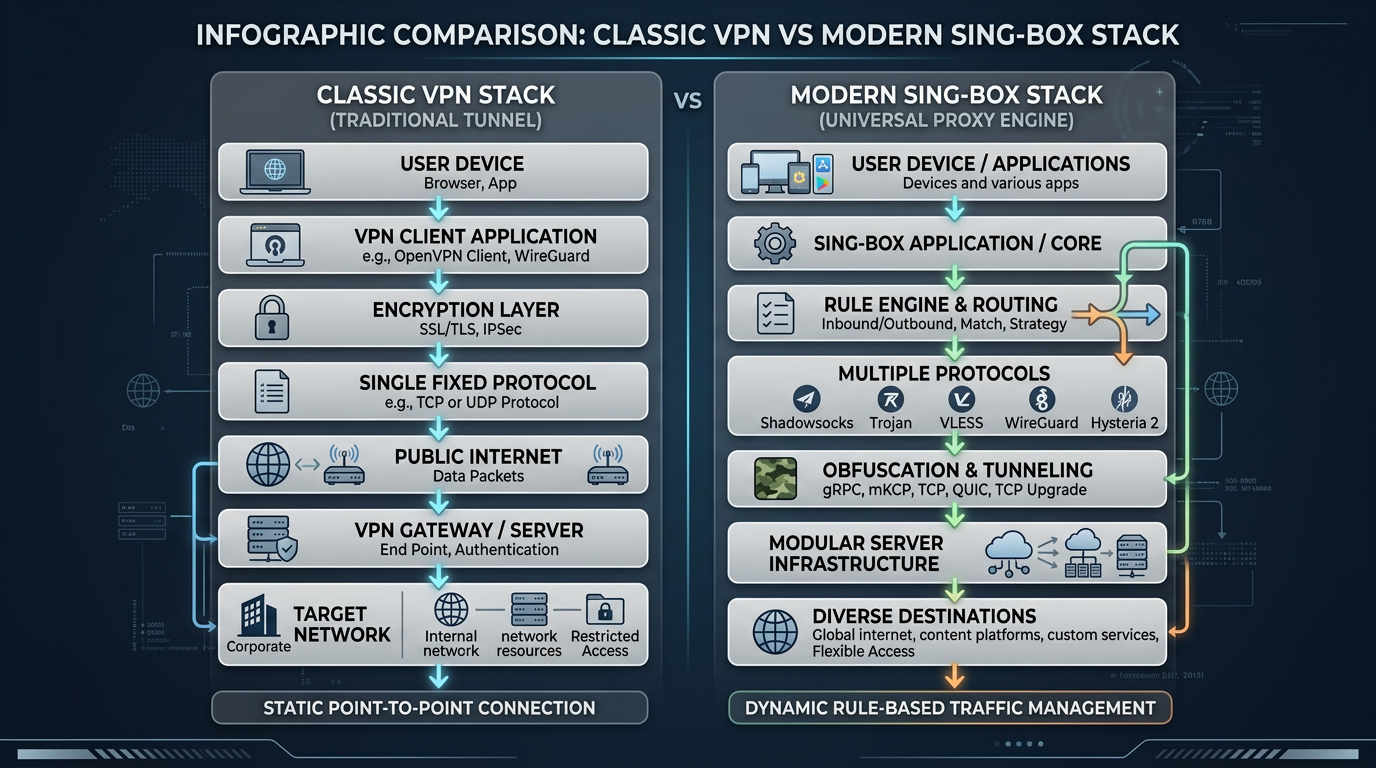
What has changed in VPN requirements in 2026
- Mobile scenarios dominate. The phone constantly jumps between network twists - the protocol must survive reconnect without getting stuck.
- Video communication is sensitive to jitter. Even with good “speed”, a choppy ping kills the quality.
- Multiple devices. One user - Android, Windows and iPad; profiles should be imported without any mysticism.
- The key is like a product. The speed of delivery and clear instructions (including QR) decide more than rare “tricks”.
A general overview of choosing a service can be found in best VPN 2026: how to choose; comparison of the three protocols head-on - in Hysteria 2 vs WireGuard vs Reality.
Reality: why does a practicing user need it?
The Reality protocol (in conjunction with the right client and profile) is aimed at scenarios where the stability of the handshake and the predictable behavior of traffic signature on the wire are important. In practice, this often means fewer surprises when the link degrades and a smoother user experience on short, “bad” portions of the route. Reality is not “magic”, but an engineering tool: its effectiveness depends on the quality of the profile, the correct time on the device and the absence of conflicting filters on the OS.
Hysteria 2: acceleration where the network is crumbling
Hysteria 2 focuses on congestion control and operation on lossy lines. If you often see degradation on the mobile Internet, but the server is healthy, Hysteria 2 can restore the feeling of “normal” speed by cleverly working with retransmissions and data windows.
When coupled with node monitoring (as with mature operators), this turns into a tangible advantage - especially in mobility.
WireGuard: fast classic “with a good line”
WireGuard remains the benchmark for simplicity and performance where packet loss is moderate. It is loved for its minimalism and good speed on a “normal” home channel. In public networks, you sometimes have to combine WG with routing policies rather than expecting miracles from the protocol alone.
How HiddifySales uses a modern stack
HiddifySales consciously relies on Reality + Hysteria 2 as working pillars for users who value fast vpn, secure vpn and predictable support. How you get access is also important: instant key issuance, QR for a quick start on vpn for android, plus clear tracks for vpn for windows and vpn for ios - see HiddifySales on Android with QR, HiddifySales on Windows 11, HiddifySales on iOS and iPad.
Mini-recommendations for choosing a profile
| Symptom | Where to look first |
|---|---|
| Latency jumps on LTE | Try Hysteria 2, change the nearest node |
| Only upload slows down | Check router/MTU, compare other times of day |
| Everything is ok on Wi-Fi, but bad on the mobile network | Often the last repeater is to blame; need loss-friendly transport |
| After the laptop sleeps, the tunnel is “dead” | Client reconnection policy, energy saving |
Which protocol to choose when
| Protocol | When to use | What to check in the client |
|---|---|---|
| Reality | Need stable performance on difficult routes and a smooth handshake | Time on device, correct profile, current client |
| Hysteria 2 | LTE/public Wi-Fi, noticeable packet loss, spiking speed | Nearest node, power saving mode, MTU |
| WireGuard | Home or office channel without severe losses | Routing, DNS and interface priority |
What to check in the client profile
- Are there at least two working nodes nearby, and not just one “ideal” one?
- Is the delay, transport and subscription renewal date visible in the application?
- Does the device kill the tunnel after sleep or network change?
This approach is more useful than endlessly arguing about which protocol is “best in general.” In 2026, it’s not the name that wins, but the predictability of behavior on your channel.
[Image: 2026 VPN checklist infographic—privacy, speed, protocol transparency, support, price—dark neutral icons.]
[Image: tunnel diagram device → encrypted hop → server, data-protection focus.]
[Image: modern VPN client UI mock—ping row and profile picker.]
[Image: flat chart latency vs stability for blog.]
[Image: phone showing QR next to laptop—fast onboarding.]
[Image: diagram VPN protocols 2026—HiddifySales minimalist corporate palette.]
[Image: 24/7 support block—chat icon.]
[Image: Reality & Hysteria 2 pictograms in a row.]
[Image: Android, Windows, iOS, router collage—consistent colors.]
[Image: mid-article CTA banner “get a key in minutes”.]
[Image: DNS/MTU settings in generic client—no PII.]
[Image: abstract waves “speed & stability” background.]
Conclusion
Want a fast, private VPN today? Open HiddifySales pricing and you can get a working key moments after checkout. If a short trial appears in the current plan list, you can validate speed and stability on your devices calmly.
Read next: VPN protocols in 2026: Reality & Hysteria 2, VPN pricing in 2026, HiddifySales on Android with QR.